

Heat Basics#
## What is Heat for?#
Straight from our GitHub repository:
Heat builds on PyTorch and mpi4py to provide high-performance computing infrastructure for memory-intensive applications within the NumPy/SciPy ecosystem.
With Heat you can:
port existing NumPy/SciPy code from single-CPU to multi-node clusters with minimal coding effort;
exploit the entire, cumulative RAM of your many nodes for memory-intensive operations and algorithms;
run your NumPy/SciPy code on GPUs (CUDA, ROCm, Apple MPS, coming up: Intel XPUs).
Why?
significant scalability with respect to task-parallel frameworks;
analysis of massive datasets without breaking them up in artificially independent chunks;
ease of use: script and test on your laptop, port straight to HPC cluster;
PyTorch-based: GPU support beyond the CUDA ecosystem.
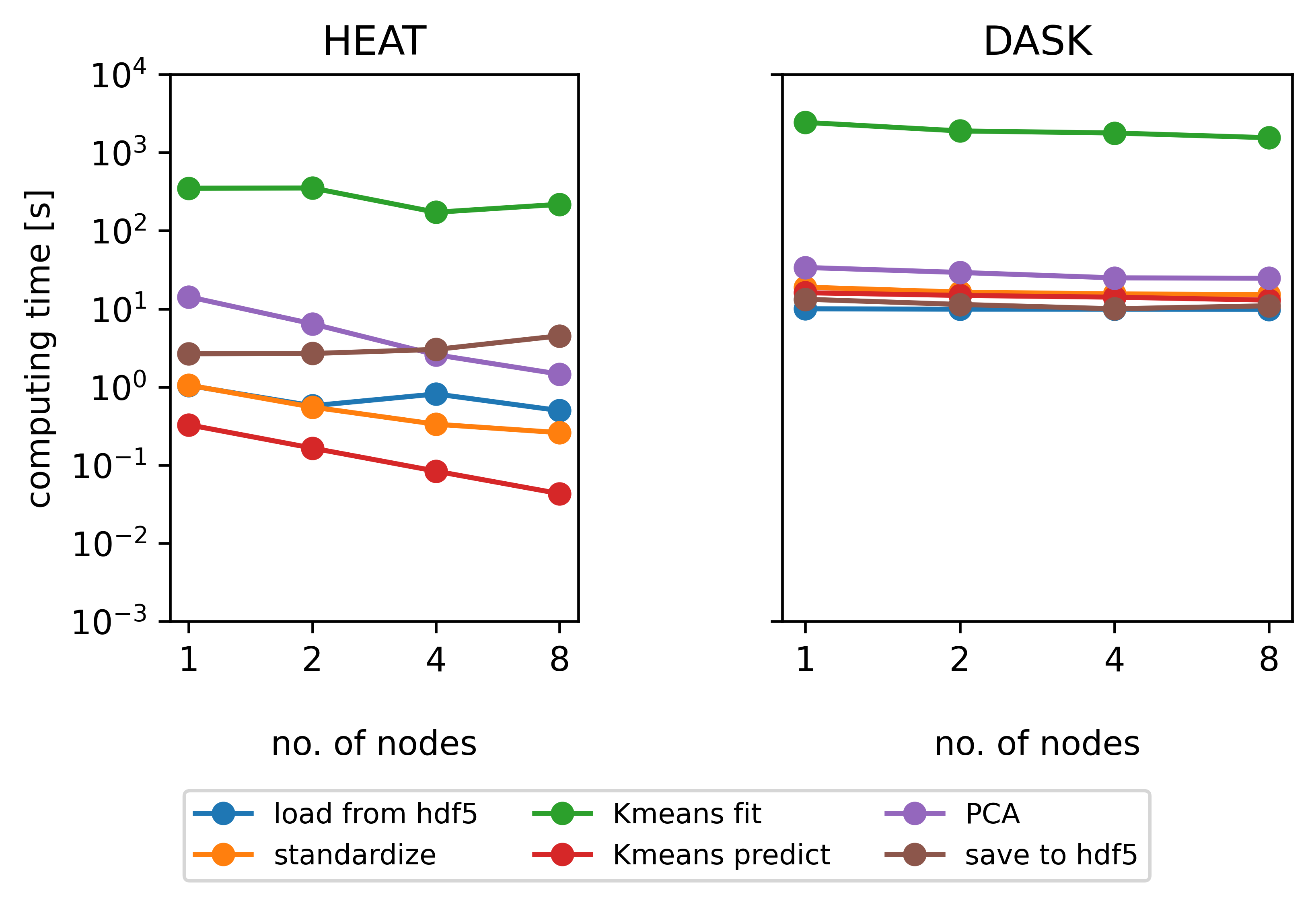
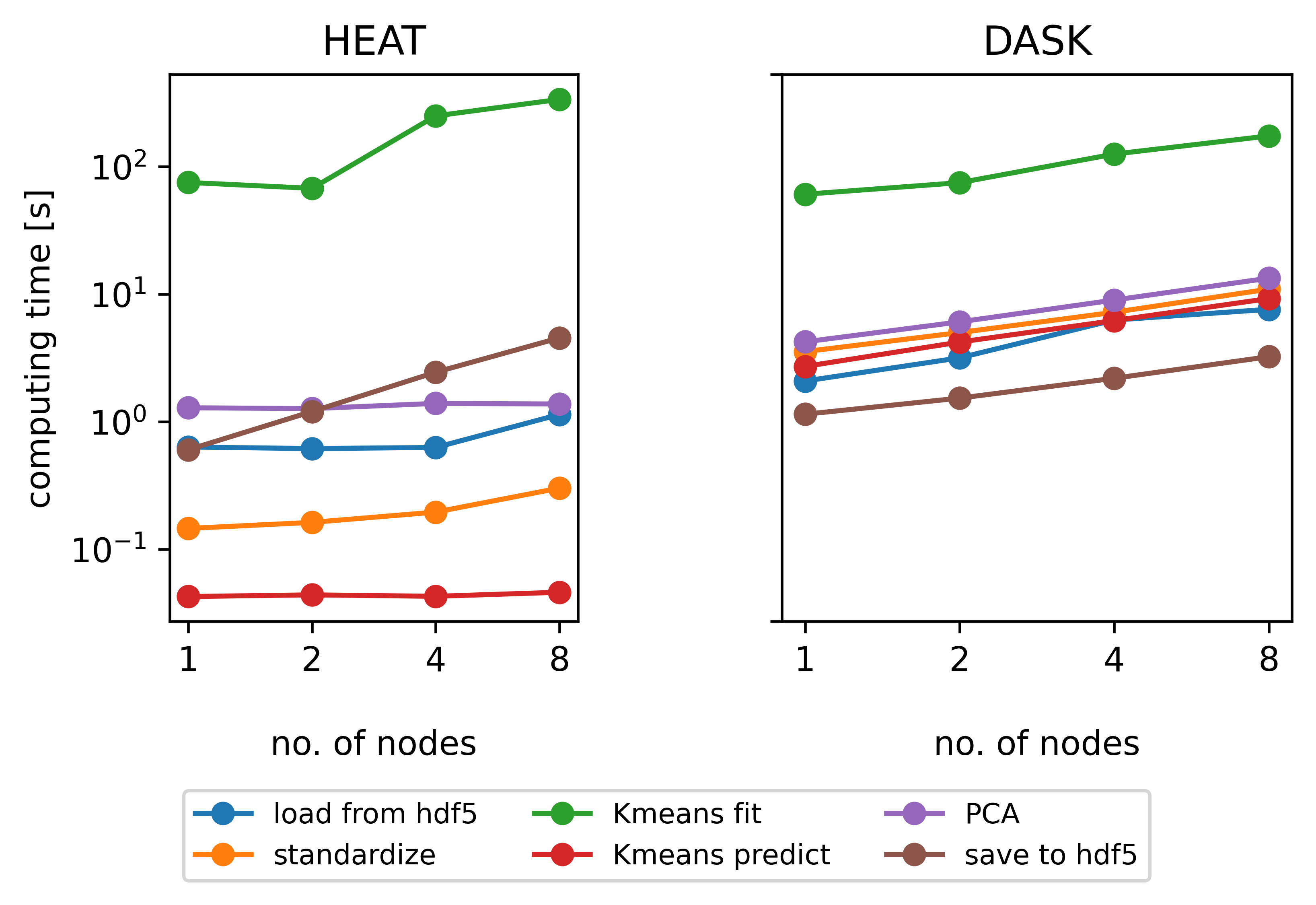
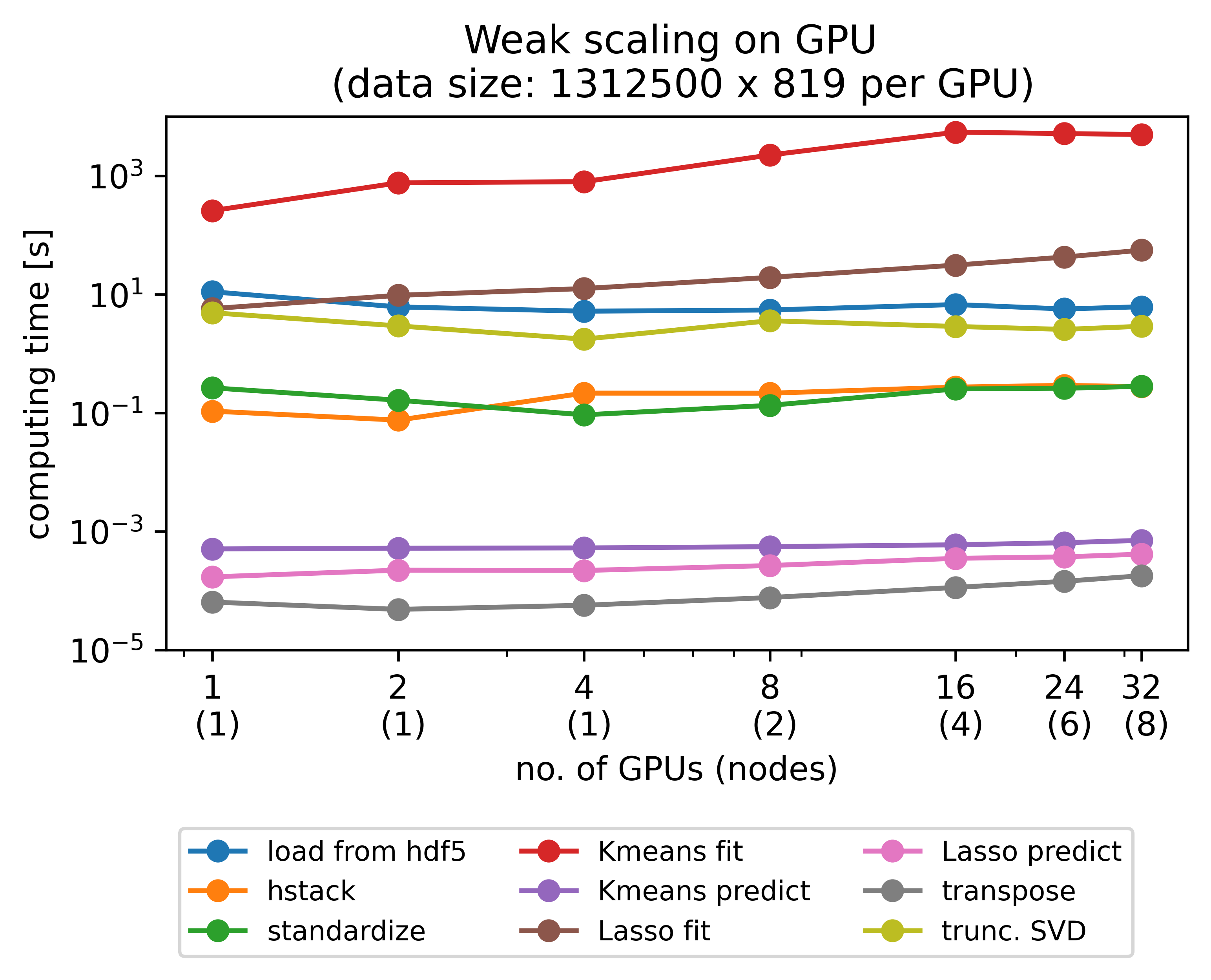
(from left to right: Strong scaling on CPUs, weak scaling on CPUs, Weak scaling on GPUs)
Connecting to ipyparallel cluster#
We have started an ipcluster with 4 engines at the end of the Setup notebook.
Let’s start the interactive session with a look into the heat data object. But first, we need to import the ipyparallel client.
[ ]:
from ipyparallel import Client
rc = Client(profile="default")
rc.ids

if len(rc.ids) == 0:
    print("No engines found")
else:
    print(f"{len(rc.ids)} engines found")
4 engines found
We will always start heat cells with the %%px magic command to execute the cell on all engines. However, the first section of this tutorial doesn’t deal with distributed arrays.
DNDarrays#
Similar to a NumPy ndarray, a Heat dndarray (we’ll get to the d later) is a grid of values of a single (one particular) type. The number of dimensions is the number of axes of the array, while the shape of an array is a tuple of integers giving the number of elements of the array along each dimension.
Heat emulates NumPy’s API as closely as possible, allowing for the use of well-known array creation functions.
[ ]:
%%px
import heat as ht
a = ht.array([1, 2, 3])
a
[stderr:3] /home/hopp_fa/heat/heat/core/_config.py:104: UserWarning: Heat has CUDA GPU-support (PyTorch version 2.7.1+cu126 and `torch.cuda.is_available() = True`), but CUDA-awareness of MPI could not be detected. This may lead to performance degradation as direct MPI-communication between GPUs is not possible.
  warnings.warn(
[stderr:2] /home/hopp_fa/heat/heat/core/_config.py:104: UserWarning: Heat has CUDA GPU-support (PyTorch version 2.7.1+cu126 and `torch.cuda.is_available() = True`), but CUDA-awareness of MPI could not be detected. This may lead to performance degradation as direct MPI-communication between GPUs is not possible.
  warnings.warn(
[stderr:0] /home/hopp_fa/heat/heat/core/_config.py:104: UserWarning: Heat has CUDA GPU-support (PyTorch version 2.7.1+cu126 and `torch.cuda.is_available() = True`), but CUDA-awareness of MPI could not be detected. This may lead to performance degradation as direct MPI-communication between GPUs is not possible.
  warnings.warn(
[stderr:1] /home/hopp_fa/heat/heat/core/_config.py:104: UserWarning: Heat has CUDA GPU-support (PyTorch version 2.7.1+cu126 and `torch.cuda.is_available() = True`), but CUDA-awareness of MPI could not be detected. This may lead to performance degradation as direct MPI-communication between GPUs is not possible.
  warnings.warn(
Out[0:1]: DNDarray([1, 2, 3], dtype=ht.int64, device=cpu:0, split=None)
[ ]:
%%px
a = ht.ones((4, 5,))
[ ]:
%%px
ht.arange(10)
Out[0:4]: DNDarray([0, 1, 2, 3, 4, 5, 6, 7, 8, 9], dtype=ht.int32, device=cpu:0, split=None)
[ ]:
%%px
ht.full((3, 2,), fill_value=9)
Out[0:5]:
DNDarray([[9., 9.],
          [9., 9.],
          [9., 9.]], dtype=ht.float32, device=cpu:0, split=None)
Data Types#
Heat supports various data types and operations to retrieve and manipulate the type of a Heat array. However, in contrast to NumPy, Heat is limited to logical (bool) and numerical types (uint8, int16/32/64, float32/64, and complex64/128).
NOTE: by default, Heat will allocate floating-point values in single precision, due to a much higher processing performance on GPUs. This is one of the main differences between Heat and NumPy.
[ ]:
%%px
a = ht.zeros((3, 4,))
a
Out[0:6]:
DNDarray([[0., 0., 0., 0.],
          [0., 0., 0., 0.],
          [0., 0., 0., 0.]], dtype=ht.float32, device=cpu:0, split=None)
[ ]:
%%px
b = a.astype(ht.int64)
b
Out[0:7]:
DNDarray([[0, 0, 0, 0],
          [0, 0, 0, 0],
          [0, 0, 0, 0]], dtype=ht.int64, device=cpu:0, split=None)
Operations#
Heat supports many mathematical operations, ranging from simple element-wise functions, binary arithmetic operations, and linear algebra, to more powerful reductions. Operations are by default performed on the entire array or they can be performed along one or more of its dimensions when available. Most relevant for data-intensive applications is that all Heat functionalities support memory-distributed computation and GPU acceleration. This holds for all operations, including reductions, statistics, linear algebra, and high-level algorithms.
You can try out the few simple examples below if you want, but we will skip to the Parallel Processing section to see memory-distributed operations in action.
[ ]:
%%px
a = ht.full((3, 4,), 8)
b = ht.ones((3, 4,))
[ ]:
%%px
a + b
Out[0:9]:
DNDarray([[9., 9., 9., 9.],
          [9., 9., 9., 9.],
          [9., 9., 9., 9.]], dtype=ht.float32, device=cpu:0, split=None)
[ ]:
%%px
ht.sub(a, b)
Out[0:10]:
DNDarray([[7., 7., 7., 7.],
          [7., 7., 7., 7.],
          [7., 7., 7., 7.]], dtype=ht.float32, device=cpu:0, split=None)
[ ]:
%%px
ht.arange(5).sin()
Out[0:11]: DNDarray([ 0.0000, 0.8415, 0.9093, 0.1411, -0.7568], dtype=ht.float32, device=cpu:0, split=None)
[ ]:
%%px
a.T
Out[0:12]:
DNDarray([[8., 8., 8.],
          [8., 8., 8.],
          [8., 8., 8.],
          [8., 8., 8.]], dtype=ht.float32, device=cpu:0, split=None)
[ ]:
%%px
b.sum(axis=1)
Out[0:13]: DNDarray([4., 4., 4.], dtype=ht.float32, device=cpu:0, split=None)
Heat implements the same broadcasting rules (implicit repetion of an operation when the rank/shape of the operands do not match) as NumPy does, e.g.:
[ ]:
%%px
ht.arange(10) + 3
Out[0:14]: DNDarray([ 3, 4, 5, 6, 7, 8, 9, 10, 11, 12], dtype=ht.int32, device=cpu:0, split=None)
[ ]:
%%px
a = ht.ones((3, 4,))
b = ht.arange(4)
c = a + b

a, b, c
Out[3:15]: (, , )
Out[0:15]:
(DNDarray([[1., 1., 1., 1.],
          [1., 1., 1., 1.],
          [1., 1., 1., 1.]], dtype=ht.float32, device=cpu:0, split=None),
 DNDarray([0, 1, 2, 3], dtype=ht.int32, device=cpu:0, split=None),
 DNDarray([[1., 2., 3., 4.],
          [1., 2., 3., 4.],
          [1., 2., 3., 4.]], dtype=ht.float32, device=cpu:0, split=None))
Out[1:15]: (, , )
Out[2:15]: (, , )
Indexing#
Heat allows the indexing of arrays, and thereby, the extraction of a partial view of the elements in an array. It is possible to obtain single values as well as entire chunks, i.e. slices.
[ ]:
%%px
a = ht.arange(10)
a
Out[0:16]: DNDarray([0, 1, 2, 3, 4, 5, 6, 7, 8, 9], dtype=ht.int32, device=cpu:0, split=None)
[ ]:
%%px
a[3]
Out[0:17]: DNDarray(3, dtype=ht.int32, device=cpu:0, split=None)
[ ]:
%%px
a[1:7]
Out[0:18]: DNDarray([1, 2, 3, 4, 5, 6], dtype=ht.int32, device=cpu:0, split=None)
[ ]:
%%px
a[::2]
Out[0:19]: DNDarray([0, 2, 4, 6, 8], dtype=ht.int32, device=cpu:0, split=None)
NOTE: Indexing in Heat is undergoing a major overhaul, to increase interoperability with NumPy/PyTorch indexing, and to provide a fully distributed item setting functionality. Stay tuned for this feature in the next release.
Documentation#
Heat is extensively documented. You may find the online API reference on Read the Docs: Heat Documentation. It is also possible to look up the docs in an interactive session.
[ ]:
%%px
help(ht.sum)
[stdout:2] Help on function sum in module heat.core.arithmetics:

sum(a: 'DNDarray', axis: 'Union[int, Tuple[int, ...]]' = None, out: 'DNDarray' = None, keepdims: 'bool' = None) -> 'DNDarray'
    Sum of array elements over a given axis. An array with the same shape as ``self.__array`` except
    for the specified axis which becomes one, e.g.
    ``a.shape=(1, 2, 3)`` => ``ht.ones((1, 2, 3)).sum(axis=1).shape=(1, 1, 3)``

    Parameters
    ----------
    a : DNDarray
        Input array.
    axis : None or int or Tuple[int,...], optional
        Axis along which a sum is performed. The default, ``axis=None``, will sum all of the
        elements of the input array. If ``axis`` is negative it counts from the last to the first
        axis. If ``axis`` is a tuple of ints, a sum is performed on all of the axes specified in the
        tuple instead of a single axis or all the axes as before.
    out : DNDarray, optional
        Alternative output array in which to place the result. It must have the same shape as the
        expected output, but the datatype of the output values will be cast if necessary.
    keepdims : bool, optional
        If this is set to ``True``, the axes which are reduced are left in the result as dimensions
        with size one. With this option, the result will broadcast correctly against the input
        array.

    Examples
    --------
    >>> ht.sum(ht.ones(2))
    DNDarray(2., dtype=ht.float32, device=cpu:0, split=None)
    >>> ht.sum(ht.ones((3, 3)))
    DNDarray(9., dtype=ht.float32, device=cpu:0, split=None)
    >>> ht.sum(ht.ones((3, 3)).astype(ht.int))
    DNDarray(9, dtype=ht.int64, device=cpu:0, split=None)
    >>> ht.sum(ht.ones((3, 2, 1)), axis=-3)
    DNDarray([[3.],
              [3.]], dtype=ht.float32, device=cpu:0, split=None)
[stdout:0] Help on function sum in module heat.core.arithmetics:

sum(a: 'DNDarray', axis: 'Union[int, Tuple[int, ...]]' = None, out: 'DNDarray' = None, keepdims: 'bool' = None) -> 'DNDarray'
    Sum of array elements over a given axis. An array with the same shape as ``self.__array`` except
    for the specified axis which becomes one, e.g.
    ``a.shape=(1, 2, 3)`` => ``ht.ones((1, 2, 3)).sum(axis=1).shape=(1, 1, 3)``

    Parameters
    ----------
    a : DNDarray
        Input array.
    axis : None or int or Tuple[int,...], optional
        Axis along which a sum is performed. The default, ``axis=None``, will sum all of the
        elements of the input array. If ``axis`` is negative it counts from the last to the first
        axis. If ``axis`` is a tuple of ints, a sum is performed on all of the axes specified in the
        tuple instead of a single axis or all the axes as before.
    out : DNDarray, optional
        Alternative output array in which to place the result. It must have the same shape as the
        expected output, but the datatype of the output values will be cast if necessary.
    keepdims : bool, optional
        If this is set to ``True``, the axes which are reduced are left in the result as dimensions
        with size one. With this option, the result will broadcast correctly against the input
        array.

    Examples
    --------
    >>> ht.sum(ht.ones(2))
    DNDarray(2., dtype=ht.float32, device=cpu:0, split=None)
    >>> ht.sum(ht.ones((3, 3)))
    DNDarray(9., dtype=ht.float32, device=cpu:0, split=None)
    >>> ht.sum(ht.ones((3, 3)).astype(ht.int))
    DNDarray(9, dtype=ht.int64, device=cpu:0, split=None)
    >>> ht.sum(ht.ones((3, 2, 1)), axis=-3)
    DNDarray([[3.],
              [3.]], dtype=ht.float32, device=cpu:0, split=None)
[stdout:3] Help on function sum in module heat.core.arithmetics:

sum(a: 'DNDarray', axis: 'Union[int, Tuple[int, ...]]' = None, out: 'DNDarray' = None, keepdims: 'bool' = None) -> 'DNDarray'
    Sum of array elements over a given axis. An array with the same shape as ``self.__array`` except
    for the specified axis which becomes one, e.g.
    ``a.shape=(1, 2, 3)`` => ``ht.ones((1, 2, 3)).sum(axis=1).shape=(1, 1, 3)``

    Parameters
    ----------
    a : DNDarray
        Input array.
    axis : None or int or Tuple[int,...], optional
        Axis along which a sum is performed. The default, ``axis=None``, will sum all of the
        elements of the input array. If ``axis`` is negative it counts from the last to the first
        axis. If ``axis`` is a tuple of ints, a sum is performed on all of the axes specified in the
        tuple instead of a single axis or all the axes as before.
    out : DNDarray, optional
        Alternative output array in which to place the result. It must have the same shape as the
        expected output, but the datatype of the output values will be cast if necessary.
    keepdims : bool, optional
        If this is set to ``True``, the axes which are reduced are left in the result as dimensions
        with size one. With this option, the result will broadcast correctly against the input
        array.

    Examples
    --------
    >>> ht.sum(ht.ones(2))
    DNDarray(2., dtype=ht.float32, device=cpu:0, split=None)
    >>> ht.sum(ht.ones((3, 3)))
    DNDarray(9., dtype=ht.float32, device=cpu:0, split=None)
    >>> ht.sum(ht.ones((3, 3)).astype(ht.int))
    DNDarray(9, dtype=ht.int64, device=cpu:0, split=None)
    >>> ht.sum(ht.ones((3, 2, 1)), axis=-3)
    DNDarray([[3.],
              [3.]], dtype=ht.float32, device=cpu:0, split=None)
[stdout:1] Help on function sum in module heat.core.arithmetics:

sum(a: 'DNDarray', axis: 'Union[int, Tuple[int, ...]]' = None, out: 'DNDarray' = None, keepdims: 'bool' = None) -> 'DNDarray'
    Sum of array elements over a given axis. An array with the same shape as ``self.__array`` except
    for the specified axis which becomes one, e.g.
    ``a.shape=(1, 2, 3)`` => ``ht.ones((1, 2, 3)).sum(axis=1).shape=(1, 1, 3)``

    Parameters
    ----------
    a : DNDarray
        Input array.
    axis : None or int or Tuple[int,...], optional
        Axis along which a sum is performed. The default, ``axis=None``, will sum all of the
        elements of the input array. If ``axis`` is negative it counts from the last to the first
        axis. If ``axis`` is a tuple of ints, a sum is performed on all of the axes specified in the
        tuple instead of a single axis or all the axes as before.
    out : DNDarray, optional
        Alternative output array in which to place the result. It must have the same shape as the
        expected output, but the datatype of the output values will be cast if necessary.
    keepdims : bool, optional
        If this is set to ``True``, the axes which are reduced are left in the result as dimensions
        with size one. With this option, the result will broadcast correctly against the input
        array.

    Examples
    --------
    >>> ht.sum(ht.ones(2))
    DNDarray(2., dtype=ht.float32, device=cpu:0, split=None)
    >>> ht.sum(ht.ones((3, 3)))
    DNDarray(9., dtype=ht.float32, device=cpu:0, split=None)
    >>> ht.sum(ht.ones((3, 3)).astype(ht.int))
    DNDarray(9, dtype=ht.int64, device=cpu:0, split=None)
    >>> ht.sum(ht.ones((3, 2, 1)), axis=-3)
    DNDarray([[3.],
              [3.]], dtype=ht.float32, device=cpu:0, split=None)
Parallel Processing#
Heat’s actual power lies in the possibility to exploit the processing performance of modern accelerator hardware (GPUs) as well as distributed (high-performance) cluster systems. All operations executed on CPUs are, to a large extent, vectorized (AVX) and thread-parallelized (OpenMP). Heat builds on PyTorch, so it supports GPU acceleration on Nvidia and AMD GPUs.
For distributed computations, your system or laptop needs to have Message Passing Interface (MPI) installed. For GPU computations, your system needs to have one or more suitable GPUs and (MPI-aware) CUDA/ROCm ecosystem.
NOTE: The GPU examples below will only properly execute on a computer with a GPU. Make sure to either start the notebook on an appropriate machine or copy and paste the examples into a script and execute it on a suitable device.
GPUs#
Heat’s array creation functions all support an additional parameter that places the data on a specific device. By default, the CPU is selected, but it is also possible to directly allocate the data on a GPU.
The following cells will only work if you have a GPU available.
[ ]:
%%px
ht.zeros((3, 4,), device='gpu')
Out[0:21]:
DNDarray([[0., 0., 0., 0.],
          [0., 0., 0., 0.],
          [0., 0., 0., 0.]], dtype=ht.float32, device=gpu:0, split=None)
Arrays on the same device can be seamlessly used in any Heat operation.
[ ]:
%%px
a = ht.zeros((3, 4,), device='gpu')
b = ht.ones((3, 4,), device='gpu')
a + b
Out[0:22]:
DNDarray([[1., 1., 1., 1.],
          [1., 1., 1., 1.],
          [1., 1., 1., 1.]], dtype=ht.float32, device=gpu:0, split=None)
However, performing operations on arrays with mismatching devices will purposefully result in an error (due to potentially large copy overhead).
[ ]:
%%px
a = ht.full((3, 4,), 4, device='cpu')
b = ht.ones((3, 4,), device='gpu')
a + b
[1:execute]
---------------------------------------------------------------------------
RuntimeError                              Traceback (most recent call last)
/tmp/ipykernel_2337973/396898532.py in <module>
      1 a = ht.full((3, 4,), 4, device='cpu')
      2 b = ht.ones((3, 4,), device='gpu')
----> 3 a + b

~/heat/heat/core/arithmetics.py in _add(self, other)
    122 def _add(self, other):
    123     try:
--> 124         return add(self, other)
    125     except TypeError:
    126         return NotImplemented

~/heat/heat/core/arithmetics.py in add(t1, t2, out, where)
    117               [5., 6.]], dtype=ht.float32, device=cpu:0, split=None)
    118     """
--> 119     return _operations.__binary_op(torch.add, t1, t2, out, where)
    120
    121

~/heat/heat/core/_operations.py in __binary_op(operation, t1, t2, out, where, fn_kwargs)
    202         promoted_type = torch.float32
    203
--> 204     result = operation(t1.larray.to(promoted_type), t2.larray.to(promoted_type), **fn_kwargs)
    205
    206     if out is None and where is True:

RuntimeError: Expected all tensors to be on the same device, but found at least two devices, cuda:1 and cpu!
[2:execute]
---------------------------------------------------------------------------
RuntimeError                              Traceback (most recent call last)
/tmp/ipykernel_2337974/396898532.py in <module>
      1 a = ht.full((3, 4,), 4, device='cpu')
      2 b = ht.ones((3, 4,), device='gpu')
----> 3 a + b

~/heat/heat/core/arithmetics.py in _add(self, other)
    122 def _add(self, other):
    123     try:
--> 124         return add(self, other)
    125     except TypeError:
    126         return NotImplemented

~/heat/heat/core/arithmetics.py in add(t1, t2, out, where)
    117               [5., 6.]], dtype=ht.float32, device=cpu:0, split=None)
    118     """
--> 119     return _operations.__binary_op(torch.add, t1, t2, out, where)
    120
    121

~/heat/heat/core/_operations.py in __binary_op(operation, t1, t2, out, where, fn_kwargs)
    202         promoted_type = torch.float32
    203
--> 204     result = operation(t1.larray.to(promoted_type), t2.larray.to(promoted_type), **fn_kwargs)
    205
    206     if out is None and where is True:

RuntimeError: Expected all tensors to be on the same device, but found at least two devices, cuda:0 and cpu!
[0:execute]
---------------------------------------------------------------------------
RuntimeError                              Traceback (most recent call last)
/tmp/ipykernel_2337972/396898532.py in <module>
      1 a = ht.full((3, 4,), 4, device='cpu')
      2 b = ht.ones((3, 4,), device='gpu')
----> 3 a + b

~/heat/heat/core/arithmetics.py in _add(self, other)
    122 def _add(self, other):
    123     try:
--> 124         return add(self, other)
    125     except TypeError:
    126         return NotImplemented

~/heat/heat/core/arithmetics.py in add(t1, t2, out, where)
    117               [5., 6.]], dtype=ht.float32, device=cpu:0, split=None)
    118     """
--> 119     return _operations.__binary_op(torch.add, t1, t2, out, where)
    120
    121

~/heat/heat/core/_operations.py in __binary_op(operation, t1, t2, out, where, fn_kwargs)
    202         promoted_type = torch.float32
    203
--> 204     result = operation(t1.larray.to(promoted_type), t2.larray.to(promoted_type), **fn_kwargs)
    205
    206     if out is None and where is True:

RuntimeError: Expected all tensors to be on the same device, but found at least two devices, cuda:0 and cpu!
[3:execute]
---------------------------------------------------------------------------
RuntimeError                              Traceback (most recent call last)
/tmp/ipykernel_2337975/396898532.py in <module>
      1 a = ht.full((3, 4,), 4, device='cpu')
      2 b = ht.ones((3, 4,), device='gpu')
----> 3 a + b

~/heat/heat/core/arithmetics.py in _add(self, other)
    122 def _add(self, other):
    123     try:
--> 124         return add(self, other)
    125     except TypeError:
    126         return NotImplemented

~/heat/heat/core/arithmetics.py in add(t1, t2, out, where)
    117               [5., 6.]], dtype=ht.float32, device=cpu:0, split=None)
    118     """
--> 119     return _operations.__binary_op(torch.add, t1, t2, out, where)
    120
    121

~/heat/heat/core/_operations.py in __binary_op(operation, t1, t2, out, where, fn_kwargs)
    202         promoted_type = torch.float32
    203
--> 204     result = operation(t1.larray.to(promoted_type), t2.larray.to(promoted_type), **fn_kwargs)
    205
    206     if out is None and where is True:

RuntimeError: Expected all tensors to be on the same device, but found at least two devices, cuda:1 and cpu!
4 errors
It is possible to explicitly move an array from one device to the other and back to avoid this error.
[ ]:
%%px
a = ht.full((3, 4,), 4, device='gpu')
a.cpu()
Out[0:24]:
DNDarray([[4., 4., 4., 4.],
          [4., 4., 4., 4.],
          [4., 4., 4., 4.]], dtype=ht.float32, device=cpu:0, split=None)
We’ll put our multi-GPU setup to the test in the next section.
Distributed Computing#
Heat is also able to make use of distributed processing capabilities such as those in high-performance cluster systems. For this, Heat exploits the fact that the operations performed on a multi-dimensional array are usually identical for all data items. Hence, a data-parallel processing strategy can be chosen, where the total number of data items is equally divided among all processing nodes. An operation is then performed individually on the local data chunks and, if necessary, communicates partial results behind the scenes. A Heat array assumes the role of a virtual overlay of the local chunks and realizes and coordinates the computations - see the figure below for a visual representation of this concept.

The chunks are always split along a singular dimension (i.e. 1-D domain decomposition) of the array. You can specify this in Heat by using the split parameter. This parameter is present in all relevant functions, such as array creation (zeros(), ones(), ...) or I/O (load()) functions.
Examples are provided below. The result of an operation on DNDarays will in most cases preserve the split or distribution axis of the respective operands. However, in some cases the split axis might change. For example, a transpose of a Heat array will equally transpose the split axis. Furthermore, a reduction operation, e.g. sum(), that is performed across the split axis, might remove data partitions entirely. The respective function behaviors can be found in Heat’s documentation.
You may also modify the data partitioning of a Heat array by using the resplit() function. This allows you to repartition the data as you so choose. Please note, that this should be used sparingly and for small data amounts only, as it entails significant data copying across the network. Finally, a Heat array without any split, i.e. split=None (default), will result in redundant copies of data on each computation node.
On a technical level, Heat follows the so-called Bulk Synchronous Parallel (BSP) processing model. For the network communication, Heat utilizes the Message Passing Interface (MPI), a de facto standard on modern high-performance computing systems. It is also possible to use MPI on your laptop or desktop computer. Respective software packages are available for all major operating systems. In order to run a Heat script, you need to start it slightly differently than you are probably used to. This
python ./my_script.py
becomes this instead:
mpirun -n <number_of_processors> python ./my_script.py
On an HPC cluster you’ll of course use SBATCH or similar.
Let’s see some examples of working with distributed Heat arrays:
In the following examples, we’ll recreate the array shown in the figure, a 3-dimensional DNDarray of integers ranging from 0 to 59 (5 matrices of size (4,3)).
[ ]:
%%px
import heat as ht
dndarray = ht.arange(60).reshape(5,4,3)
dndarray
Out[0:25]:
DNDarray([[[ 0,  1,  2],
           [ 3,  4,  5],
           [ 6,  7,  8],
           [ 9, 10, 11]],

          [[12, 13, 14],
           [15, 16, 17],
           [18, 19, 20],
           [21, 22, 23]],

          [[24, 25, 26],
           [27, 28, 29],
           [30, 31, 32],
           [33, 34, 35]],

          [[36, 37, 38],
           [39, 40, 41],
           [42, 43, 44],
           [45, 46, 47]],

          [[48, 49, 50],
           [51, 52, 53],
           [54, 55, 56],
           [57, 58, 59]]], dtype=ht.int32, device=cpu:0, split=None)
Notice the additional metadata printed with the DNDarray. With respect to a numpy ndarray, the DNDarray has additional information on the device (in this case, the CPU) and the split axis. In the example above, the split axis is None, meaning that the DNDarray is not distributed and each MPI process has a full copy of the data.
Let’s experiment with a distributed DNDarray: we’ll split the same DNDarray as above, but distributed along the major axis.
[ ]:
%%px
dndarray = ht.arange(60, split=0).reshape(5,4,3)
dndarray
Out[0:2]:
DNDarray([[[ 0,  1,  2],
           [ 3,  4,  5],
           [ 6,  7,  8],
           [ 9, 10, 11]],

          [[12, 13, 14],
           [15, 16, 17],
           [18, 19, 20],
           [21, 22, 23]],

          [[24, 25, 26],
           [27, 28, 29],
           [30, 31, 32],
           [33, 34, 35]],

          [[36, 37, 38],
           [39, 40, 41],
           [42, 43, 44],
           [45, 46, 47]],

          [[48, 49, 50],
           [51, 52, 53],
           [54, 55, 56],
           [57, 58, 59]]], dtype=ht.int32, device=cpu:0, split=0)
The split axis is now 0, meaning that the DNDarray is distributed along the first axis. Each MPI process has a slice of the data along the first axis. In order to see the data on each process, we can print the “local array” via the larray attribute.
[ ]:
%%px
dndarray.larray
Out[2:27]:
tensor([[[36, 37, 38],
         [39, 40, 41],
         [42, 43, 44],
         [45, 46, 47]]], dtype=torch.int32)
Out[1:27]:
tensor([[[24, 25, 26],
         [27, 28, 29],
         [30, 31, 32],
         [33, 34, 35]]], dtype=torch.int32)
Out[0:27]:
tensor([[[ 0,  1,  2],
         [ 3,  4,  5],
         [ 6,  7,  8],
         [ 9, 10, 11]],

        [[12, 13, 14],
         [15, 16, 17],
         [18, 19, 20],
         [21, 22, 23]]], dtype=torch.int32)
Out[3:27]:
tensor([[[48, 49, 50],
         [51, 52, 53],
         [54, 55, 56],
         [57, 58, 59]]], dtype=torch.int32)
Note that the larray is a torch.Tensor object. This is the underlying tensor that holds the data. The dndarray object is an MPI-aware wrapper around these process-local tensors, providing memory-distributed functionality and information.
The DNDarray can be distributed along any axis. Modify the split attribute when creating the DNDarray in the cell above, to distribute it along a different axis, and see how the larrays change. You’ll notice that the distributed arrays are always load-balanced, meaning that the data is distributed as evenly as possible across the MPI processes.
The DNDarray object has a number of methods and attributes that are useful for distributed computing. In particular, it keeps track of its global and local (on a given process) shape through distributed operations and array manipulations. The DNDarray is also associated to a comm object, the MPI communicator.
(In MPI, the communicator is a group of processes that can communicate with each other. The comm object is a MPI.COMM_WORLD communicator, which is the default communicator that includes all the processes. The comm object is used to perform collective operations, such as reductions, scatter, gather, and broadcast. The comm object is also used to perform point-to-point communication between processes.)
[ ]:
%%px
print(f"Global shape of the dndarray: {dndarray.shape}")
print(f"On rank {dndarray.comm.rank}/{dndarray.comm.size}, local shape of the dndarray: {dndarray.lshape}")
[stdout:1] Global shape of the dndarray: (5, 4, 3)
On rank 1/4, local shape of the dndarray: (1, 4, 3)
[stdout:0] Global shape of the dndarray: (5, 4, 3)
On rank 0/4, local shape of the dndarray: (2, 4, 3)
[stdout:2] Global shape of the dndarray: (5, 4, 3)
On rank 2/4, local shape of the dndarray: (1, 4, 3)
[stdout:3] Global shape of the dndarray: (5, 4, 3)
On rank 3/4, local shape of the dndarray: (1, 4, 3)
You can perform a vast number of operations on DNDarrays distributed over multi-node and/or multi-GPU resources. Check out our Numpy coverage tables to see what operations are already supported.
[ ]:
%%px
# transpose
dndarray.T
Out[0:29]:
DNDarray([[[ 0, 12, 24, 36, 48],
           [ 3, 15, 27, 39, 51],
           [ 6, 18, 30, 42, 54],
           [ 9, 21, 33, 45, 57]],

          [[ 1, 13, 25, 37, 49],
           [ 4, 16, 28, 40, 52],
           [ 7, 19, 31, 43, 55],
           [10, 22, 34, 46, 58]],

          [[ 2, 14, 26, 38, 50],
           [ 5, 17, 29, 41, 53],
           [ 8, 20, 32, 44, 56],
           [11, 23, 35, 47, 59]]], dtype=ht.int32, device=cpu:0, split=2)
[ ]:
%%px
# reduction operation along the distribution axis
%timeit -n 1 dndarray.sum(axis=0)
[stdout:0] The slowest run took 32.65 times longer than the fastest. This could mean that an intermediate result is being cached.
200 µs ± 276 µs per loop (mean ± std. dev. of 7 runs, 1 loop each)
[stdout:1] The slowest run took 22.67 times longer than the fastest. This could mean that an intermediate result is being cached.
169 µs ± 220 µs per loop (mean ± std. dev. of 7 runs, 1 loop each)
[stdout:2] The slowest run took 37.03 times longer than the fastest. This could mean that an intermediate result is being cached.
194 µs ± 287 µs per loop (mean ± std. dev. of 7 runs, 1 loop each)
[stdout:3] The slowest run took 41.47 times longer than the fastest. This could mean that an intermediate result is being cached.
192 µs ± 320 µs per loop (mean ± std. dev. of 7 runs, 1 loop each)
[ ]:
%%px
# reduction operation along non-distribution axis: no communication required
%timeit -n 1 dndarray.sum(axis=1)
[stdout:0] The slowest run took 30.48 times longer than the fastest. This could mean that an intermediate result is being cached.
136 µs ± 162 µs per loop (mean ± std. dev. of 7 runs, 1 loop each)
[stdout:1] The slowest run took 27.16 times longer than the fastest. This could mean that an intermediate result is being cached.
193 µs ± 219 µs per loop (mean ± std. dev. of 7 runs, 1 loop each)
[stdout:2] The slowest run took 18.36 times longer than the fastest. This could mean that an intermediate result is being cached.
67.1 µs ± 89.3 µs per loop (mean ± std. dev. of 7 runs, 1 loop each)
[stdout:3] The slowest run took 18.05 times longer than the fastest. This could mean that an intermediate result is being cached.
61 µs ± 87.6 µs per loop (mean ± std. dev. of 7 runs, 1 loop each)
Operations between tensors with equal split or no split are fully parallelizable and therefore very fast.
[ ]:
%%px
other_dndarray = ht.arange(60,120, split=0).reshape(5,4,3) # distributed reshape

# element-wise multiplication
dndarray * other_dndarray
Out[0:32]:
DNDarray([[[   0,   61,  124],
           [ 189,  256,  325],
           [ 396,  469,  544],
           [ 621,  700,  781]],

          [[ 864,  949, 1036],
           [1125, 1216, 1309],
           [1404, 1501, 1600],
           [1701, 1804, 1909]],

          [[2016, 2125, 2236],
           [2349, 2464, 2581],
           [2700, 2821, 2944],
           [3069, 3196, 3325]],

          [[3456, 3589, 3724],
           [3861, 4000, 4141],
           [4284, 4429, 4576],
           [4725, 4876, 5029]],

          [[5184, 5341, 5500],
           [5661, 5824, 5989],
           [6156, 6325, 6496],
           [6669, 6844, 7021]]], dtype=ht.int32, device=cpu:0, split=0)
As we saw earlier, because the underlying data objects are PyTorch tensors, we can easily create DNDarrays on GPUs or move DNDarrays to GPUs. This allows us to perform distributed array operations on multi-GPU systems.
So far we have demonstrated small, easy-to-parallelize arithmetical operations. Let’s move to linear algebra. Heat’s linalg module supports a wide range of linear algebra operations, including matrix multiplication. Matrix multiplication is a very common operation in data analysis, it is computationally intensive, and not trivial to parallelize.
With Heat, you can perform matrix multiplication on distributed DNDarrays, and the operation will be parallelized across the MPI processes. Here on 4 GPUs:
[ ]:
%%px
# free up memory if necessary
try:
    del x, y, z
except NameError:
    pass

n, m = 4000, 4000
x = ht.random.randn(n, m, split=0, device="gpu") # distributed RNG
y = ht.random.randn(m, n, split=None, device="gpu")
z =  x @ y
ht.linalg.matmul or @ breaks down the matrix multiplication into a series of smaller torch matrix multiplications, which are then distributed across the MPI processes. This operation can be very communication-intensive on huge matrices that both require distribution, and users should choose the split axis carefully to minimize communication overhead.
You can experiment with sizes and the split parameter (distribution axis) for both matrices and time the result. Note that:
If you set ``split=None`` for both matrices, each process (in this case, each GPU) will attempt to multiply the entire matrices. Depending on the matrix sizes, the GPU memory might be insufficient. (And if you can multiply the matrices on a single GPU, it’s much more efficient to stick to PyTorch’s
torch.linalg.matmulfunction.)If ``split`` is not None for both matrices, each process will only hold a slice of the data, and will need to communicate data with other processes in order to perform the multiplication. This introduces huge communication overhead, but allows you to perform the multiplication on larger matrices than would not fit in the memory of a single GPU.
If ``split`` is None for one matrix and not None for the other, the multiplication does not require communication, and the result will be distributed. If your data size allows it, you should always favor this option.
Time the multiplication for different split parameters and see how the performance changes.
[ ]:
%%px
z = %timeit -n 1 -r 5 x @ y
[stdout:0] The slowest run took 46.16 times longer than the fastest. This could mean that an intermediate result is being cached.
1.63 ms ± 2.82 ms per loop (mean ± std. dev. of 5 runs, 1 loop each)
[stdout:2] The slowest run took 49.04 times longer than the fastest. This could mean that an intermediate result is being cached.
1.72 ms ± 3 ms per loop (mean ± std. dev. of 5 runs, 1 loop each)
[stdout:3] The slowest run took 43.62 times longer than the fastest. This could mean that an intermediate result is being cached.
1.55 ms ± 2.67 ms per loop (mean ± std. dev. of 5 runs, 1 loop each)
[stdout:1] The slowest run took 43.82 times longer than the fastest. This could mean that an intermediate result is being cached.
1.55 ms ± 2.67 ms per loop (mean ± std. dev. of 5 runs, 1 loop each)
Heat supports many linear algebra operations:
>>> ht.linalg.
ht.linalg.basics        ht.linalg.hsvd_rtol(    ht.linalg.projection(   ht.linalg.triu(
ht.linalg.cg(           ht.linalg.inv(          ht.linalg.qr(           ht.linalg.vdot(
ht.linalg.cross(        ht.linalg.lanczos(      ht.linalg.solver        ht.linalg.vecdot(
ht.linalg.det(          ht.linalg.matmul(       ht.linalg.svdtools      ht.linalg.vector_norm(
ht.linalg.dot(          ht.linalg.matrix_norm(  ht.linalg.trace(
ht.linalg.hsvd(         ht.linalg.norm(         ht.linalg.transpose(
ht.linalg.hsvd_rank(    ht.linalg.outer(        ht.linalg.tril(
and a lot more is in the works, including distributed eigendecompositions, SVD, and more. If the operation you need is not yet supported, leave us a note here and we’ll get back to you.
You can of course perform all operations on CPUs. You can leave out the device attribute entirely.
Interoperability#
We can easily create DNDarrays from PyTorch tensors and numpy ndarrays. We can also convert DNDarrays to PyTorch tensors and numpy ndarrays. This makes it easy to integrate Heat into existing PyTorch and numpy workflows. Here a basic example with xarrays:
[ ]:
%%px
import xarray as xr

local_xr = xr.DataArray(dndarray.larray, dims=("z", "y", "x"))
# proceed with local xarray operations
local_xr
<xarray.DataArray (z: 1, y: 4, x: 3)> Size: 48B
array([[[24, 25, 26],
        [27, 28, 29],
        [30, 31, 32],
        [33, 34, 35]]], dtype=int32)
Dimensions without coordinates: z, y, x<xarray.DataArray (z: 2, y: 4, x: 3)> Size: 96B
array([[[ 0,  1,  2],
        [ 3,  4,  5],
        [ 6,  7,  8],
        [ 9, 10, 11]],

       [[12, 13, 14],
        [15, 16, 17],
        [18, 19, 20],
        [21, 22, 23]]], dtype=int32)
Dimensions without coordinates: z, y, x<xarray.DataArray (z: 1, y: 4, x: 3)> Size: 48B
array([[[48, 49, 50],
        [51, 52, 53],
        [54, 55, 56],
        [57, 58, 59]]], dtype=int32)
Dimensions without coordinates: z, y, x<xarray.DataArray (z: 1, y: 4, x: 3)> Size: 48B
array([[[36, 37, 38],
        [39, 40, 41],
        [42, 43, 44],
        [45, 46, 47]]], dtype=int32)
Dimensions without coordinates: z, y, xNOTE: this is not a distributed xarray, but local xarray objects on each rank. Work on expanding xarray support is ongoing.
Heat will try to reuse the memory of the original array as much as possible. If you would prefer a copy with different memory, the copy keyword argument can be used when creating a DNDArray from other libraries.
[ ]:
%%px
import torch
torch_array = torch.arange(5)
heat_array = ht.array(torch_array, copy=False)
heat_array[0] = -1
print(torch_array)

torch_array = torch.arange(5)
heat_array = ht.array(torch_array, copy=True)
heat_array[0] = -1
print(torch_array)
[stdout:2] tensor([-1,  1,  2,  3,  4])
tensor([0, 1, 2, 3, 4])
[stdout:3] tensor([-1,  1,  2,  3,  4])
tensor([0, 1, 2, 3, 4])
[stdout:1] tensor([-1,  1,  2,  3,  4])
tensor([0, 1, 2, 3, 4])
[stdout:0] tensor([-1,  1,  2,  3,  4])
tensor([0, 1, 2, 3, 4])
Interoperability is a key feature of Heat, and we are constantly working to increase Heat’s compliance with the Python array API standard. As usual, please let us know if you encounter any issues or have any feature requests.
Exercise: Array Manipulation (Basic and Distributed)#
This exercise shows the difference between a standard array and a distributed array when performing operations.
Part 1: Basic Operations (split=None, sample code below)
Task: Create a 10×5 DNDarray of random integers between 0 and 9 (inclusive).
Calculate its transpose (A.T).
Find the maximum value along the second axis (axis=1).
If you have a GPU available, try creating the same array on the GPU and repeat the operations.
Part 2: Distributed Operations (split=0)
Task: Repeat the steps, but distribute the original array A along its first axis (split=0).
NB: Notice how the split property now changes after transpose (from 0 to 1) and is removed (None) after the reduction over the split axis (axis=1). The lshape also shows the local data chunk size.
[ ]:
%%px
### Exercise Part 1, sample code

import heat as ht

# Task 1: Create a 10x5 DNDarray (no split/split=None)
# NOTE: Change 'cpu' to 'gpu' if you have one!
A = ht.random.randint(0, 10, size=(10, 5))

# Task 2: Calculate the transpose 'A_T'
A_T = A.T

# Task 3: Find the maximum value along axis=1
max_vals = ht.max(A, axis=1)

# Check: Print properties and results (only on rank 0)
if A.comm.rank == 0:
    print("--- Part 1: Basic Operations (split=None) ---")
    print(f"A: Shape={A.shape}, Split={A.split}, Device={A.device}")
    print(f"A_T: Shape={A_T.shape}, Split={A_T.split}, Device={A_T.device}")
    print(f"Max Vals: Shape={max_vals.shape}, Split={max_vals.split}, Device={max_vals.device}")
    print(f"Max Vals Result (A's Maxima):\n{max_vals}")
[stdout:0] --- Part 1: Basic Operations (split=None) ---
A: Shape=(10, 5), Split=None, Device=cpu:0
A_T: Shape=(5, 10), Split=None, Device=cpu:0
Max Vals: Shape=(10,), Split=None, Device=cpu:0
Max Vals Result (A's Maxima):
DNDarray([7, 8, 5, 8, 5, 9, 7, 9, 9, 7], dtype=ht.int32, device=cpu:0, split=None)
[ ]:
%%px
## Exercise Part 2, your code here